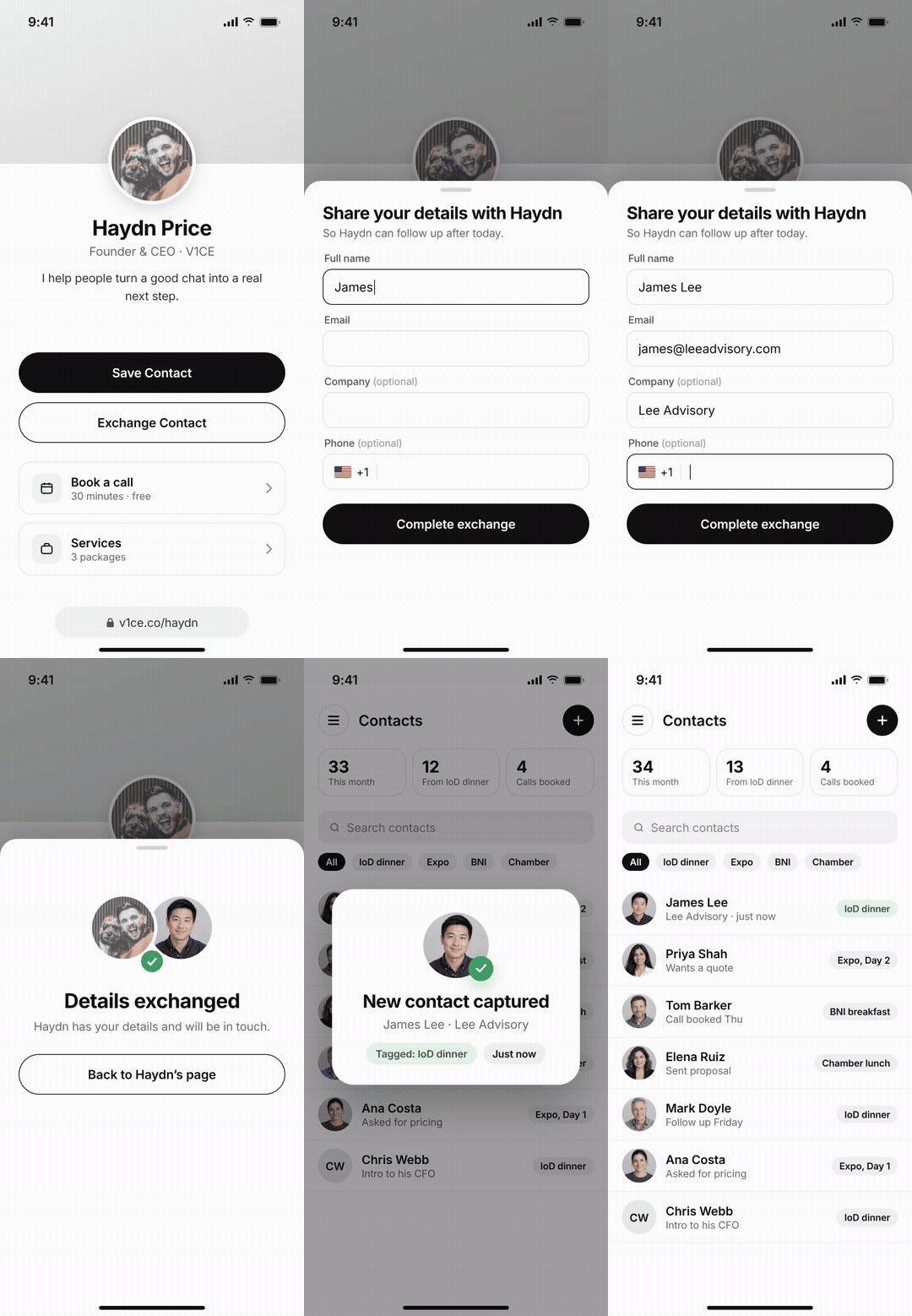
Here is the problem with the paper card you hand over. You know how it ends. It gets crumpled in a wallet, or tossed in a drawer, and most of them are gone within a week. You meet good people, you have great conversations, and then nothing happens.
There is a reason it matters more than it feels like it should. You have about seven seconds to make a first impression, and the research is actually harsher than that. Princeton psychologists Willis and Todorov found that people judge your trustworthiness and competence from your face in about a tenth of a second (Psychological Science, 2006). And Lindgaard and colleagues found people form a view on a web page's visual appeal in about 50 milliseconds (2006), which matters here, because your profile page gets judged just as fast as your face does. The card has to look the part before you have said a word.
So over the last few weeks I personally tested 25 digital business cards to find the ones that actually get your details into someone's phone, get the contact saved, and earn a reply afterwards. Most don't. Below is the honest ranking, scores and all, including the one card you can start using for free today.
The selection process: what I scored
I judged all 25 the way the person on the other end of the handshake does. The first test, before a single feature matters, is simple: does it look like something you'd be proud to hand over?
Here's what I scored, in the order that actually counts:
1. Look and feel. Would I be proud to hand it over, and does the profile page look as good? 2. Does it get the contact saved? One tap, into their phone, and the contact captured into mine. 3. What happens after the tap. Does the follow-up send itself, or am I back to typing names into a spreadsheet at 10pm? 4. Wallet and NFC that work in the real world, with a QR backup so it never fails. 5. Contacts and CRM integrations I can use without losing an afternoon to setup. 6. Plain analytics I can act on. 7. A clear, public privacy stance (GDPR and CCPA). 8. Fair value at the entry plan, ideally free to start.
I tested 25. Twelve made the cut: V1CE, Wave Connect, HiHello, Blinq, Popl, Mobilo, Uniqode, Linq, Tapni, Haystack, Dot, Ovou.
Why I can be trusted to rank these
Let me be straight with you before you read another word. I founded V1CE, so I am not a neutral reviewer, and I am not going to pretend to be one. What I can do is show my working and tell you where mine loses. V1CE drops points in ranking for an app that is still being rebuilt and a layout that takes a sitting to learn, and there are providers on this list I would genuinely point you to first for one specific job: Popl if you live at trade-show booths, Mobilo if you are kitting out a sales floor today. That is in the reviews below, in plain sight.
Here is why I am in a position to rank them at all. I have personally tested 25 of these platforms over the last few weeks, and more than 50 since launching in 2020. I have used these cards across tables at real events, built profiles on each one, and watched which ones actually got the contact saved.
And here is the proof that does not come from me:
500,000+ professionals now carry a V1CE card including professionals at Space X, Google, Emirates and more.
4.82 on Trustpilot from over 1,000 reviews, and 4.86 on Loox from over 2,500.
Featured In Forbes, Business Insider, G2, Product Hunt, and TechRadar.
I am not asking you to take my word for any of it. The reviews are public, the scores are public, and the honest cons are right there in each section below.
Our free version gives you what the others make you pay for
Here is the honest summary of every card I tested.
Tool
Free plan?
Score
Best for
Its honest edge over V1CE
V1CE
Yes, full
9.8
Networking for a living: capture to close in one system
Fastest to set up; software-only, no card to carry
Tapni
No
6.0
Budget NFC card
Affordable entry-level option
Five of these have no free plan at all. Where they do, they cap cards, watermark, limit design, or cap how many people you can capture. V1CE gives unlimited cards and the whole design and sharing layer free. What other companies charge for, we give away on our free tier with no restrictions.
I put V1CE first for a reason most lists miss. You judge a card in about seven seconds, and this is the one people actually reacted to. I use these often at events and got "Wow, what is this? Where can I get one?" more times in a night than my paper cards earned in a year. It looks and feels premium, and that's the point: the look gets you the conversation, and what sits behind it keeps the contact.
One tap shared my details, and also dropped their details straight into my dashboard, the follow-up email went out without me touching it. It's also the only card here whose free plan gives you what the others charge for. Here's exactly what it does, where it shines, and the two things it still gets wrong.
What you get, in plain terms
One tap to share, by NFC, QR, link, or wallet, and it works on every iPhone since 2018 and every modern Android.
The contact lands in your dashboard automatically, so you're not typing names into a spreadsheet later.
V1CE sends the follow-up for you, in your voice, keeping you front of mind.
Simple to understand analytics: views, taps, saves, the things you can act on.
Custom design, including video backgrounds, so the profile page looks as good as the card.
Agentic themes and card variations that are made for each profession.
The part other cards don't have: what happens after the tap
Most cards stop at sharing your details. V1CE keeps going, and this is the bit that turns a nice conversation into a client.
We launched the brand new "Client Capture OS". Everything works together, because it was built together, for the in person networker, not large enterprise teams. Your contact capture feeds your Contacts (your built-in networking CRM, so you don't need a separate one). Your Contacts trigger your follow-ups, which send themselves in your voice. Your follow-ups carry a booking link (no need for calendly), so the person you just met can book you while it's still fresh. And your bookings lead to agreements you can e-sign and services you can get paid for, all from the same dashboard. Campaigns tag where you met someone so you know what events led to clients, Check-ins keep warm contacts warm, and referral tracking shows you who the people you met are introducing you to.
There's one piece nobody else has: Meet Scout, an AI assistant that researches who's attending an event before you go, so you walk in already knowing who to talk to and what to say.
Three steps, in plain English. Meet them. Capture them. Close them. From the handshake to the invoice. The card gets you into the phone; the system turns that into a client.
V1CE Pricing
Free plan: Unlimited cards, all design tools, no monthly fee. Free for life
Client Capture OS: $49.99/mo - Starts with a free 30-day trial and a complimentary physical NFC card, cancel anytime.
Anyone who networks to win clients and wants a card that feels premium in the hand plus a system behind it, from consultants to coaches and beyond.
Pros & Cons
Pros
Cons
Quick to set up and fast to share.
The mobile app is still being rebuilt, so for now I'd manage everything from the web dashboard. It does everything the app will.
The contact capture and follow-ups are built in, not bolted on.
The layout takes a minute to learn. Once it clicks, it's quick, but the first sitting is a small learning curve.
Clean analytics and it connects to the tools you already use.
Free design service, so the card looks like you, not a template.
The widest range of cards I tested, and custom video backgrounds.
Ratings and reviews
I'm not asking you to take my word for it.
500,000+ professionals use V1CE, it's been featured on G2, Product Hunt, and TechRadar, and it sits at 4.82 on Trustpilot (1,000 reviews) and 4.86 on Loox (2,500).
Here's what customers told us in their own words:
"Paper cards are a thing of the past. We invested in our V1CE cards and never looked back."
"Everyone always asks us where we got them made."
"They called me for the job."
My Experience With V1CE
Setting up my digital profile took less than two minutes. I tapped the card on my iPhone, and my profile opened right away. The design looked smooth and professional from the start.
The design builder has more options than any other platform I've tried. I could add my logo, background, custom background video, and brand colors to make my card stand out. I can also add and sell my services, reviews, credentials and stats which again no other provider offers. The builder felt easy to use and gave me total control of how my digital business card looked. I made a profile as a tech reviewer and the options to embed videos and even add an FAQ's really stood out for me.
V1CE also designed my physical NFC business card for me. I didn’t have to do anything except approve the final look. They shipped it to me within forty-eight hours, which no other company did. Lastly, they offer a 100% guarentee, meaning if it ever gets scratched (of which they do) V1CE replaces it free of charge. Each order also plants a tree, which Is great.
I joined using their free thirty-day trial. It gave me full access to every feature and even included a free physical NFC card. I could cancel anytime during the trial.
At a local networking event, I shared my V1CE card more than twenty times. Every new contact that I captured via contact capture appeared in my dashboard right away. I could see who opened my card, who saved my info, and who replied. It turned quick chats into real business contacts. Shop the cards I tested→
Updated May 2026: V1CE has launched a redesigned analytics dashboard that gives real-time contact tracking and visual engagement reports.
My Final Review and Thoughts on V1CE, 9.8
My score: 9.8. Here's why it tops my list, plainly.
The card looks premium to start the conversation, which is the seven-second test every other card on this list is also trying to pass. The free plan does what the others charge for. And it's the only one here that doesn't stop at sharing your details: it carries you from the handshake to the invoice.
It loses a few points for the app rebuild and the small learning curve, both honest, both fixable. Everything else is the closest I found to the system I always wanted.
More than a card: the Client Capture OS
Here is the honest reason V1CE tops my list, and it has nothing to do with the card looking good, though it does. The card is the door. The Client Capture OS is the room behind it.
Most of us are great at the conversation and have no system for what happens next. The card gets binned, the follow-up never happens, the warm contact goes cold, and when someone is finally ready to work with you, you are scrambling between five apps to make it happen. I lived that for years.
So I describe what V1CE does as a chain, because that is what it is. Your contact capture feeds your Contacts. Your Contacts trigger your follow-ups. Your follow-ups carry a booking link. And your bookings lead to agreements you can e-sign and services you can get paid for. One connected system, not five apps stitched together.
The features, named:
Smart Card. Your physical NFC business card, completely free, with lifetime replacements while you are on plan. One tap and you are in their phone.
Contacts, with an Action List. Your built-in networking CRM. New contacts land automatically the moment someone fills your capture form, and your dashboard shows a Next Action List, where the AI works out your next moves from what people have actually done across your system.
Campaigns. Attribution. Tag an event and every new contact gets tagged automatically, so you know which events actually bring you clients.
Smart follow-ups. Automated and trigger-based: a two-way exchange, a form fill, a booking, a signed agreement, a purchase or a tag can each fire a follow-up that sends in your voice.
Check-ins. Scheduled broadcasts that keep warm contacts warm: re-engage a stale contact, a quarterly check-in, an event invite.
Scout. An AI assistant that researches who is attending an event before you go, so you walk in knowing who to talk to.
Booking. Multiple booking types, booked straight from your profile, no back and forth. It replaces Calendly.
Agreements. E-signatures you upload, describe to the AI, or send from a saved template. It replaces DocuSign.
Services. Add services to your page and sell them individually, with 0% transaction fees.
Referrals. See who the people you met are introducing you to.
Insights, plus unlimited pages. Your Meet, Capture, Close funnel and ROI by source, and as many pages as you need.
The free plan gives you the whole front end: unlimited cards, the design and sharing layer, and basic capture, with no monthly fee. The Client Capture OS is $49.99 a month when you want the system behind it. Test the free card first. If it is not worth it, you have spent nothing.
Tap into the Future of Networking.
Our Digital Business Cards let people save your info instantly with just one tap.
2. Mobilo, Best Digital Business Card for Sales Teams
Mobilo is built for professionals and teams that take networking seriously. It’s not just a digital business card; it’s a contact generation tool that helps track, follow up, and measure every interaction. With multiple card types, real-time analytics, and automated workflows, Mobilo is perfect for salespeople, recruiters, and event professionals who want to turn introductions into action.
Mobilo focuses heavily on performance and data. Every tap, scan, or share can be tracked and analyzed. You can see when someone viewed your profile, capture contacts instantly, and sync those details with your CRM. It’s designed to make networking measurable and scalable.
Here are some of the things that stood out for me here:
Advanced contact tracking and analytics. Monitor engagement in real time, see who tapped, viewed, and saved your card, and where.
Multiple NFC product types. Choose from cards, key fobs, and buttons, including high-end metal versions that feel premium.
Four unique card modes. Switch between Business Card, contact Generation, Landing Page, or Direct Link modes depending on your goal.
CRM and workflow integrations. Send new contacts directly to tools like HubSpot, Salesforce, or Zapier for instant follow-up.
Custom QR codes and email signatures. Create branded QR codes or signatures that link directly to your digital card.
Real-time dashboards for teams.
Managers can view team performance, contact stats, and engagement results across departments.
Mobilo Pricing
Cards (one-time):
Mobilo Branded: $9.50
Custom Design: $29.50
Wood Custom Design: $39.50
Metal Custom Design: $69.50
All cards include the PRO Plan free for the first 90 days.
After 90 days: $4/month per user for teams.
Pros
Cons
- Excellent analytics and contact-tracking tools.
- No free plan or trial.
- Physical NFC options, including premium metal cards.
- Minimal design customization for landing pages.
- Flexible card modes for different networking needs.
- Focused more on function than aesthetics.
- Seamless CRM and automation integrations.
Mobilo Ratings and Reviews
G2: 4.7 / 5 (2,800 Reviews)
Trustpilot: 4.8 / 5 (1,000 Reviews)
Here’s what one user said:
“Mobilo makes my networking measurable. I can track every contact from a tap and push them straight into my CRM, it saves hours of manual work.”
My Experience with Mobilo
Setting up Mobilo was different from other platforms since it required buying a physical card first. Once it arrived, setup was quick. I registered the card online, created my profile, and connected it to my CRM. The moment someone tapped my card, their details appeared instantly in my dashboard.
I was impressed by the analytics. The dashboard showed when, where, and how many people interacted with my card. The location tracking was especially useful for events. I could see which conferences or trade shows generated the most contacts.
The design options are basic, though; it’s not a tool built for visuals. You can’t add video or rich backgrounds, but that’s not what Mobilo is about. It’s made for teams that care about results and data more than design.
My Final Review and Thoughts on Mobilo, 8.5
Mobilo stands out as a performance-driven networking platform. It’s not flashy, but it’s powerful. The focus on automation, analytics, and CRM connectivity makes it perfect for teams that need to capture and convert contacts efficiently.
If your goal is to turn every introduction into a measurable opportunity, Mobilo is built for you. The lack of a free plan might limit casual users, but for professionals who value tracking and accountability, Mobilo is one of the smartest investments you can make.
3. Uniqode (formerly Beaconstac), Best Digital Business Card For Enterprise
Uniqode, previously known as Beaconstac, is a QR-focused digital business card platform trusted by large teams and enterprises. It stands out for its strong security, global scalability, and ability to manage thousands of cards under one account. Unlike most consumer-focused tools, Uniqode is built for businesses that need structure, compliance, and performance tracking, not just design.
Its QR-first approach means you don’t need to rely on NFC products. Every card works seamlessly across devices via QR or URL, and team admins can control everything from branding to analytics in one secure dashboard.
Let's chat about Uniqodes Key Features:
Enterprise-level QR business cards. Create secure, dynamic QR cards that can be updated in real time without reprinting or reissuing.
Centralized team management. Admins can create, edit, and distribute hundreds or thousands of digital cards in one click.
Advanced analytics and reporting. See how often cards are scanned, which regions engage most, and what links drive conversions.
Integrations and automations. Connect to Salesforce, HubSpot, Microsoft Dynamics, or Zapier for full workflow integration.
SAML/SSO and GDPR compliance. Built with enterprise security standards, including SOC 2 Type II certification.
Dynamic branding tools. Maintain brand consistency across every card with logos, colors, and layout templates.
Uniqode Pricing
Essential Plan ($9/month per user): Basic QR digital business cards with branded templates and analytics.
Core Plan ($49/month per user): Adds bulk creation, advanced analytics, and integrations with CRMs.
Plus Plan ($99/month per user): Designed for enterprise teams, includes SSO, advanced access controls, and global support.
Business + Plan: Tailored solutions for organizations with over 500 users or unique compliance requirements.
Uniqode offers a 14-day free trial for teams to test full features before committing.
Pros
Cons
- Excellent for large organizations and teams.
- No free plan for individuals.
- Deep analytics and tracking for every scan.
- No NFC hardware options (QR only).
- Enterprise-level security (GDPR + SOC 2 Type II).
- Interface can feel corporate for solo users.
- Custom templates keep all cards on brand.
Ratings and Reviews
G2: 4.8 / 5 (1,500 Reviews)
Trustpilot: 4.7 / 5 (800 Reviews)
Here’s what one verified review said:
“Uniqode made managing hundreds of digital business cards simple. We rolled out cards for our entire sales team in days, all fully branded and trackable. The data insights are incredible.”
My Experience with Uniqode
Using Uniqode felt like working with professional-grade software. The dashboard was sleek but clearly built for business users, not casual freelancers. Creating a card was easy: I added my logo, links, and contact details, and the system generated a branded QR instantly.
However, it does let itself down in creativity and substance; the profile is bland with barely any customisation options. Then also the information you can add to the card is pretty limited too, I think you'll see from most of the profiles this is one of the most basic; however, I think for big teams and ease of use it's definitely worth trying out. Here is the profile I made -https://smartcards.pro/11dLLG
My Final Review and Thoughts on Uniqode, 8.3
Uniqode is the go-to choice for large organizations that need structure, compliance, and insight. It’s not built for flashy personal cards, it’s designed for scalable, measurable digital identity management.
If you’re a company rolling out hundreds of cards or need to meet strict security requirements, this is the best platform available. It’s secure, data-driven, and highly customizable.
For small teams or solo users, the lack of a free plan might be a drawback. But for enterprises that value control, Uniqode leads the way in professional digital business card management.
4. Ovou, Best Digital Business Card for In-Person Networking
Ovou is a premium digital business card brand focused on elevating in-person networking. It combines beautifully designed NFC cards with a modern digital profile that’s easy to share and instantly memorable.
While many digital card platforms lean on software features, Ovou stands out for its physical craftsmanship. The cards feel solid, professional, and customizable, making them a great choice for executives, entrepreneurs, and anyone who networks face-to-face often.
Underneath the polished design, Ovou’s platform gives you tools to capture contacts, track activity, and manage contacts, all without losing that personal touch.
Ovou features that I liked:
High-end NFC business cards. Choose from sleek metal, matte, or transparent cards that can be engraved or printed with your brand design.
Instant profile sharing. Tap your Ovou card to any phone and your digital card opens instantly, no app needed.
contact capture and analytics. Track how many people view your card, see where your contacts come from, and measure engagement.
Personalized landing pages. Customize your profile with your photo, bio, links, and call-to-action buttons to encourage follow-ups.
Contact management tools. Store every connection you make directly in your dashboard with notes and tags.
Team and enterprise options. Create branded cards for your company with centralized admin control and contact reporting.
Ovou Pricing
Individual Plan ($12/month): Access to one digital card profile, contact storage, and analytics dashboard.
Pro Plan ($10/month/per user): Adds custom branding, full analytics, and contact capture forms.
Ovou’s NFC cards are sold separately, starting from $79 per card, depending on design and material.
Pros
Cons
- Beautiful, high-quality physical cards that leave an impression.
- No free plan or trial.
- Instant, app-free sharing via NFC or QR code.
- Physical cards are more expensive than average.
- Good analytics and contact tracking.
- Fewer automation features than V1CE or Tapni.
- Professional design options for brands and teams.
Ratings and Reviews
G2: 4.6 / 5 (800 Reviews)
Trustpilot: 4.7 / 5 (650 Reviews)
One verified review shared:
“Ovou impressed me with its card quality and presentation. Every time I tap my card at an event, people ask where I got it. It’s the perfect mix of style and tech.”
My Experience with Ovou
Setting up my Ovou profile was quick and straightforward. The dashboard walked me through adding my contact details, social links, and a short intro about my business. Once my profile was ready, I paired it with my NFC card in seconds. The card itself felt premium, smooth metal, laser-engraved, and clearly designed to impress. Tapping it on a phone loaded my digital card instantly, and the link preview looked professional and clean.
I liked that I could view analytics showing how many times my card was opened and which links were clicked. The contact management system was simple but worked well for logging contacts. Where Ovou stands out is in presentation. It’s the type of card that makes people pause and take notice, which is rare in a digital-first world.
My Final Review and Thoughts on Ovou, 8
Ovou is built for professionals who care about making a memorable first impression. Its focus on quality design and tactile products sets it apart from software-only competitors. It doesn’t have the deepest automation features, but it makes up for it with aesthetics, reliability, and ease of use. If your networking happens face-to-face, at meetings, conferences, or events, Ovou gives you a polished, professional edge. For individuals and teams who want digital convenience with a premium physical experience, Ovou is one of the best choices available today.
5. Popl, Best Digital Business Card For Events
Popl is one of the most well-known names in digital business cards, It’s built for professionals and teams who want complete control over how their digital card looks and works. Popl’s strength lies in its flexibility and custom branding options, but that power comes with a price.
Popl’s platform feels modern, polished, and highly customizable. You can create a landing page with videos, payment links, and embedded media that reflect your brand. It also integrates with over 5,000 tools, including major CRMs, HR systems, and automation platforms. However, to unlock most of those advanced features, you’ll need a paid plan.
Here are the key features I really liked while using Popl:
Customizable landing page. Add videos, payment links, and photos for a personalized, branded experience.
Integrations with 5,000+ apps. Connect with platforms like HubSpot, Salesforce, and Slack to keep networking data in sync.
Dual profile options. Switch between multiple profiles in the Pro plan for different business roles or events.
Widgets for iOS and Android. Quickly share your card right from your home screen.
Color themes and design tools. Customize your layout to match your business or personal brand.
Popl Pricing
Free Plan: Basic digital card and NFC functionality with a limit of five saved contacts.
Pro Plan ($6.49/month): Unlocks full design options, analytics, and unlimited contact saves.
Pro+ Plan ($11.99/month): Adds advanced integrations, dual profiles, and CRM workflows.
Teams Plan (Custom Pricing): Includes full team dashboards, centralized analytics, and admin controls.
Popl does not currently offer a free trial, and saving more than five contacts requires a paid plan.
(This is the last known pricing for Popl, they no longer show prices and instead you have to fill in a form to request pricing)
Pros
Cons
- Great for capturing contacts
- Saving more than five contacts requires a paid plan.
- Strong design flexibility with media embeds and payment links.
- Pro+ pricing ($14.99/month) is higher than most competitors.
- Integrates with thousands of business and CRM tools.
- Some support responses can be slow.
- Option to run multiple profiles under one account.
- Visitors must create an account to exchange details.
Popl Ratings and Reviews
G2: 4.6 / 5 (2,500 Reviews)
Trustpilot: 4.5 / 5 (1,200 Reviews)
Here’s what one user said about their experience:
“Popl is sleek and powerful. I love the range of NFC products and how easy it is to link everything to my page. I just wish the pricing for saving contacts was a bit more flexible.”
My Experience with Popl
Popl makes a great first impression. Setting up my profile was smoothish, and tapping the card to a phone worked instantly. The landing page was basic; it felt sort of limited in some ways
All the things you want, such as embedding videos, are behind the paywall, which isn't an issue, but if you're not interested in paying, then this definitely isn't for you.
The dual-profile option was one of my favorite parts. Switching between my business card and personal brand without logging out made Popl convenient for different audiences. However, I quickly discovered that saving more than five contacts required upgrading, which felt limiting on the free plan.
Despite the higher pricing, the software doesn't scream premium. This is often why people look for Popl Alternatives. It took a while to get through the build process, and the contact capture opens when you share your profile; you can't choose to have this as a button like you can with V1CE., This is quite frustrating. Also, my image did not load when sharing my profile on multiple occasions. You definitely couldn't use this on a free plan, as seen on my profile here: https://popl.co/profile/JN4htFlP/dash
My Final Review and Thoughts on Popl, 7.7
Popl is one of the most complete digital business card ecosystems available today. The combination of design freedom and integrations makes it ideal for professionals and organizations that value customization.
However, its pricing and contact limits make it less friendly for casual users or those on a budget. If you’re willing to invest, though, Popl delivers one of the most polished and feature-rich experiences in the space.
For teams who want digital networking tools in one system, Popl is a strong contender.
6. Wave Connect, Best Free Digital Business Card for Individuals
Wave Connect is one of the few digital business card platforms that truly gives value without forcing an upgrade. It’s built for individuals and small businesses that want a fast, flexible, and affordable way to share contact details, capture contacts, and stay organized, all inside a clean dashboard.
Wave’s free plan alone beats most paid tools. You can create your card in minutes, share it by QR or wallet, and even scan paper business cards to import new contacts. The layout feels modern, responsive, and reliable whether you’re on your phone, tablet, or laptop.
Here are some of the features that drew me to Wave:
Free forever plan with full sharing options. Create a free digital card and share it via QR code, wallet pass, or direct link.
Smart contact capture modes. Choose how your card behaves: show your info instantly, request contact details first, or use a simple download prompt.
Contact manager with tags and labels. Keep your network tidy by sorting contacts with labels and tags.
Paper card scanner built in. Turn traditional business cards into digital contacts in seconds using the built-in scanner.
Widgets and Live Activities for iOS. Access and share your card from your iPhone’s lock screen or home screen for faster networking.
SOC 2 Type 2 certified security. Your data is encrypted and protected with enterprise-grade privacy standards.
Wave Pricing
Free Plan: Includes unlimited contacts, QR and wallet sharing, contact tags, and card scanning.
Pro Plan (£5/month): Adds CRM integration, analytics tracking, and custom branding to make your card stand out.
Teams Plan (£4/month per user): Designed for small teams needing directory sync, admin controls, and SSO features.
Wave Connect is loved by users for its simplicity and reliability. Here’s what one customer said:
“Wave Connect made networking easy again. I built my card in minutes, scanned all my old paper cards, and could finally manage my contacts in one place. The fact that it’s free still blows my mind.”
My Experience With Wave Connect
Creating my Wave Connect card took less than three minutes. However, it wasn't exactly clean, when I started the sign up I uploaded an image and infortmation then once I got through to designing the profile, these has disappeared. The video embed is limited to one video and overall, there aren't many features to add to the profile compared to V1CE. Customisation is exclusively locked behind the pro subscription too, which is disappointing. Here is the profile I built using Wave - app.wavecnct.com/sam.woods.qb5k
What stood out to me was how flexible the share modes were. I could switch between “auto share,” “contact capture,” and “manual exchange” depending on where I was networking. It made the card feel smarter than most others I tested.
The contact management system was another surprise. I could tag contacts, for a free tool, that level of organization felt like a bonus.
While the builder is incredibly simple and basic, it’s fit for purpose and easy to navigate. The design templates and customization options are limited compared to others, but they do the job for people who are just starting out or who don’t need heavy design tools.
My Final Review and Thoughts on Wave Connect, 7.5
Wave Connect stands out because of how much it gives away for free. It’s built for people who want something that “just works” without monthly costs or setup headaches.
The interface is simple but smart. You can scan, share, and store contacts all in one dashboard. The contact capture mode also gives it a real advantage, something most free tools don’t even offer.
The Pro upgrade adds helpful extras like analytics and CRM integrations, but even the free version feels complete for most users. The mobile widgets and fast setup make it ideal for professionals who network often and want to keep things simple.
If you want a free, feature-packed digital business card that actually delivers, Wave Connect is the one to start with.
7. Blinq, Best Minimalist Digital Business Card
Blinq is perfect for people who want something clean, simple, and quick to set up. It focuses on the basics, sharing contact info, adding a few links, and creating a no-nonsense digital business card that works. There’s no learning curve or complex dashboard here, just a fast, easy way to get your details in front of someone new.
It’s designed with simplicity in mind. You can create your Blinq card in a few minutes, share it using a QR code, text, or email, and even access it from your Apple Watch. It may not have the deep customization or analytics of larger platforms, but what it does, it does very well.
Here are some of the best features from Blinq:
Simple and unlimited contact sharing. Send your details via QR, link, or text, unlimited times, even on the free plan.
Apple Watch widget for instant sharing. Display your QR code right on your wrist for quick, hands-free networking.
Add notes to contacts. Keep track of who you met and where for better follow-ups later.
Customizable landing page. Add your contact info, social links, payment details, or website all in one clean layout.
User-friendly app and dashboard. Everything is easy to find and use, no tech skills needed.
Available as NFC cards.
Choose from Blinq-branded or fully custom NFC business cards that connect to your profile.
Blinq Pricing
Free Plan: Create one card with unlimited shares and basic customization.
Premium Plan ($9.99/month): Unlocks more design options, email signature generator, and custom domains.
Business Plan ($6.99/month per user): Includes user management, company branding, and analytics dashboard.
Enterprise: Book a sales call.
Pros
Cons
- Simple interface that’s easy for anyone to use.
- No analytics or CRM integrations.
- Unlimited sharing, even on the free plan.
- No video or background customization.
- Apple Watch support for on-the-go networking.
- Basic design options compared to competitors.
- Option to order matching NFC cards.
- Very few NFC card options
Ratings and Reviews
G2: 4.6 / 5 (1,800 Reviews)
Trustpilot: 4.7 / 5 (950 Reviews)
Blinq users love its simplicity and how quick it is to start using. Here’s what one reviewer said:
“I wanted something easy to share my contact info at trade shows, and Blinq just works. No setup headaches, no subscriptions I don’t need, just a clean, working digital card.”
My Experience with Blinq
Setting up my Blinq card was about as simple as it gets. I added my name, title, website, and social links, and my card was ready in under three minutes. Sharing with a QR code felt instant, and I appreciated that I could also send it via text or email with just one tap.
While the design builder is basic, it’s ideal for individuals who simply want to get up and running. The templates look clean, but don’t allow for much customization beyond colors and fonts. The builder is simple to navigate and does exactly what you expect, no extra steps, no fluff. Sometimes uploading would take a while my photo didn't show up well and took a while to upload.
I tested the sharing, and it worked smoothly. It’s easy to share at events. Still, I did miss having analytics or insights to see who viewed my card or clicked my links. Here is the card I made - https://blinq.me/Ns9FrlYyHFCP?bs=db
My Final Review and Thoughts on Blinq, 7
Blinq is ideal for professionals who want something minimal and reliable. It’s not overloaded with features, and that’s its strength. You can build, share, and manage your card with almost no effort.
If you don’t need analytics and just want a digital card that’s ready in minutes, Blinq delivers. The free plan covers most needs, and the paid version adds a few nice upgrades.
Blinq may not be the flashiest platform, but it’s one of the easiest to use. For freelancers, small business owners, or anyone new to digital business cards, it’s a smart and affordable place to start. I would look into more Blinq alternatives before settling.
8. CamCard, best digital business card for scanning and contact management
CamCard does something none of the other cards on this list do. It handles both sides of the exchange, you share your own digital card, and it scans incoming paper cards with AI so every contact you receive lands in the same place. If you're in a role where you hand out a lot of cards and receive a lot back, that two-way capture is genuinely useful.
The digital card itself shares via NFC, QR, and link, works on iPhone and Android, and connects to the CRMs most teams already use. It's not the most design-forward card on this list, but it's a solid, reliable platform with a free tier that does more than most.
Let's discuss the key features of CamCard:
Digital card sharing via NFC, QR code, link, Apple Wallet, and Google Wallet.
AI-powered scanning of incoming paper business cards, with support for 16 languages.
Automatic contact sync to Salesforce, HubSpot, Google Contacts, and Outlook.
Contact enrichment that pulls additional information from public sources.
Notifications when a contact changes company or gets promoted.
ISO 27001 certified, so your contact data is handled to a recognised security standard.
Team dashboard for managing contacts and cards centrally.
CamCard Pricing
Free Plan: digital card creation, QR sharing.
Pro Plan ($9.99/month): unlimited scanning, advanced search, cloud backup
Pro Plan ($24.99/month)
Teams Plan: Get in touch for quote.
Pros
Cons
The only tool here that scans incoming paper cards as well as sharing your own
Design options are more limited than the top tools on this list
Strong CRM integrations out of the box
Analytics are basic compared to V1CE or Uniqode
Free plan is genuinely useful
Teams pricing is expensive relative to competitors
ISO 27001 security certification
Less of a networking system, more of a contact management tool
Ratings and Reviews
G2: 4.5 / 5 (2 Reviews)
Trustpilot: 2.9 / 5 (2 Reviews)
A verified user shared:
“Camcard helped me create a card that feels truly mine. The design builder is great, and my NFC card gets compliments everywhere I go.”
My Experience with CamCard
I set CamCard up in about five minutes. The digital card itself is straightforward to build, you add your details, pick a template, and you're sharing via QR or NFC quickly. What stood out was the scanning side. I pointed it at a paper business card and it pulled the details across accurately and dropped the contact straight into the dashboard. For anyone who still receives a lot of paper cards at events, that alone saves a sitting at the end of the day typing names into a spreadsheet.
The CRM sync worked cleanly, contacts pushed through to Google Contacts without any manual steps. Where I felt it fall short was on the profile page design. It does the job, but it doesn't have the premium feel of the top tools on this list. If your first impression matters as much as your contact capture, you'll notice the difference. For pure contact management and two-way exchange, it holds up well.
My Final Review and Thoughts on CamCard, 7
My score: 7.0. CamCard earns its place on this list for one thing none of the others do, it handles both sides of the card exchange. You share your own digital card and it scans the paper ones coming back at you, so every contact from every conversation ends up in one place without any manual entry. For high-volume networkers and anyone working events, that two-way capture is genuinely useful. Where it loses points is design and depth. The profile page won't turn heads the way V1CE or Ovou will, and the analytics are light. It's a contact management tool with a digital card attached, not a full client capture system. Solid for the job it's built for. If that job is yours, it's worth the free plan to find out.
9. Dot, Best Digital Business Card For No-Fuss Digital Sharing
Dot is all about speed and simplicity. It’s one of the easiest digital business card platforms to use if you just want to share your details without setup headaches. The company focuses on plug-and-play NFC products, like sleek cards and phone buttons, that instantly share your contact info with a tap.
Unlike tools built around dashboards or analytics, Dot keeps things lightweight. You can create your card in minutes, customize a simple profile with your links and contact details, and start sharing right away. It’s a great fit for anyone who values simplicity and physical NFC products over software complexity. Here is my dot link - https://dot.cards/samwoodstech
Let's look at Dot's features that I enjoyed:
Instant NFC sharing. Dot’s NFC cards and phone dots transfer your contact info instantly with one tap. No app or sign-up needed for the receiver.
Simple profile builder. Create a clean, mobile-friendly landing page with your contact info, website, and social links.
No-frills customization. Add your photo, background color, and a few links to make your page personal but fast-loading.
Affordable NFC products. Choose from cards, phone tags, or wristbands, all linked to your digital card.
Works on all major devices. Compatible with both Android and iOS without extra steps or downloads.
Privacy-first contact sharing. You decide what information is visible and can update it anytime.
Dot Pricing
Basic Kit (free for life): Once you buy a dot card.
Pro Plan ($15/month): Unlocks additional customization, multiple links, and analytics.
Dot does not have a free plan, but all physical products come with lifetime access to the basic software.
Pros
Cons
- Extremely easy to set up and use.
- Limited analytics and no CRM integrations.
- Affordable compared to most competitors.
- Minimal design flexibility.
- No app needed to share or receive information.
- No free plan or trial.
- Variety of physical NFC products.
Ratings and Reviews
G2: 4.5 / 5 (900 Reviews)
Trustpilot: 4.6 / 5 (600 Reviews)
One reviewer summed it up well:
“Dot just works. I stuck the tag on my phone and now I can share my info anywhere in seconds. No fluff, no confusion.”
My Experience with Dot
Setting up Dot took less than five minutes. I ordered the small Dot tag, stuck it on the back of my phone, and linked it to my profile. When I tapped it against another phone, my details appeared instantly, no app required. The profile builder was okay. I added my name, job title, and social links. It was a little laborious going in and out of each section. There weren’t many design options, but the layout looked clean and professional.
I liked how lightweight everything felt. Dot didn’t try to upsell me on complex features; it just let me share my info. For everyday users, freelancers, or people who go to local events, it’s ideal. The only thing missing was deeper analytics or team features for businesses that want to track engagement.
My Final Review and Thoughts on Dot, 7
Dot is one of the simplest and most accessible digital business card solutions available. It’s built for people who value ease of use over complexity. The physical NFC products are well-made, and the tap-to-share experience is smooth every time.
While it lacks the advanced automation or analytics found in platforms like V1CE or Mobilo, Dot’s affordability and simplicity make it a smart pick for personal use or small business owners.
If you want a no-nonsense way to share your details instantly, Dot delivers exactly what you need, nothing more, nothing less. If you are looking for more I would check out Dot Card alternatives.
10. Haystack, Best Digital Business Card For Professionals
Haystack is one of the oldest digital business card apps, still going strong. It focuses on app-driven networking and contact management rather than physical NFC cards. If you prefer managing everything on your phone, from design to analytics, Haystack is one of the most complete app-based options available.
The platform gives you a simple way to create beautiful cards, exchange contact information, and stay organized through automatic updates and contact syncing. While it doesn’t have a strong physical product range like V1CE or Tapni, its mobile app experience is second to none.
Key features from haystack in more details:
Full-featured mobile app. Manage your cards, contacts, and analytics all inside a sleek iOS or Android app.
Automatic contact updates. If someone updates their Haystack card, your address book updates automatically, no manual changes needed.
Smart contact organization. Tag, sort, and search through your connections quickly, perfect for frequent networkers.
Branded templates and customization. Design a modern, mobile-friendly digital card that matches your company’s brand.
Analytics dashboard. See who viewed your card, what links got clicks, and how often your card was shared.
Team management tools. Create and manage cards for your employees with admin controls and centralized branding.
Haystack Pricing
Free Plan: One personal digital card with basic design features and limited analytics.
Pro Plan ($4.50/month): Adds analytics, custom branding, and unlimited card views.
Business Plan ($2.50/month per user): Includes team dashboards, contact syncing, and CRM integrations.
Enterprise Plan (Custom Pricing): For large organizations that need admin roles, SSO, and bulk card creation.
Pros
Cons
- Great for mobile users who prefer an app over a browser dashboard.
- No NFC products or physical cards.
- Strong analytics and contact management tools.
- Desktop tools are limited compared to app functionality.
- Auto-updating contacts keep your network current.
- Interface can feel crowded for first-time users.
- Affordable for individuals and small teams.
Ratings and Reviews
G2: 4.6 / 5 (1,200 Reviews)
Trustpilot: 4.5 / 5 (700 Reviews)
One verified user wrote:
“I’ve been using Haystack for years, it’s simple, reliable, and keeps all my contacts in one place. I love that when people update their info, I don’t have to do anything.”
My Experience with Haystack
Using Haystack felt more like managing a contact hub than just a digital card. Also, you have to use the app to create your card, which isn't an issue, but the Mac version was very glitchy, and so I had to do it on mobile. The mobile app was easy to set up and guided me through every step. I added my photo, links, and job title, and my card was ready to share in under five minutes; however, it is very basic. I suppose this is due to the emphasis being on contacts, not aesthetics. It's certainly not the best digital business card but it's CRM features shine.
The app syncs instantly, so when someone added me through my card, they appeared in my contact list with notes and tags I could edit. I also tested the automatic updates. When I changed my email, every connection with my card saw the change right away.
While I missed having a physical NFC option, I liked how focused the app was on contact organization. It’s perfect for professionals who prefer managing everything digitally rather than juggling a mix of cards and a dashboard
My Final Review and Thoughts on Haystack, 6.8
Haystack is a reliable, app-based digital business card that shines in its simplicity and smart automation. It’s not flashy, but it gets the fundamentals right. For mobile-first users who network often, it’s one of the best tools around.
While it can’t match the tactile appeal of platforms like V1CE or Tapni, Haystack’s automatic updates and contact organization make it one of the most convenient networking tools out there.
If you want a digital card that lives in your pocket and keeps your connections fresh, Haystack is a great fit for you.
11. HiHello, Best App-First Digital Business Card
HiHello keeps things straightforward. You can create your card inside the app in minutes, add your name, job title, links, and photo, and start sharing right away. The dashboard shows all your saved contacts in one place and keeps them automatically updated if another HiHello user changes their details.
Here are some of HiHello's features that stood out to me:
All-in-one mobile app for sharing and saving contacts. Create, edit, and send your digital card from iOS or Android. Every change you make syncs instantly across devices.
Multiple ways to share. Send your card with a QR code, personal link, Apple Watch widget, or even a branded virtual background in video calls.
Automatic contact updates. When other HiHello users change their info, your contact list updates automatically, no manual edits needed.
Email signature generator. Turn your card into a clickable email signature that keeps your contact info consistent across messages.
Built-in widgets and quick access. iOS and Android widgets make it easy to share your card right from the home screen.
SOC 2 certified security. All data is encrypted, keeping personal and business details secure.FC, or Apple Watch
HiHello Pricing
Free Plan: Includes one digital card, QR and link sharing, and basic personalization tools.
Professional Plan ($6/month): Adds multiple cards, branding, custom colors, and analytics.
Business Plan ($5/month per user): Designed for teams that need admin control, user roles, and integrations.
All plans include a 7-day free trial so you can test premium features before committing.
Hihello Pros & Cons
Pros
Cons
- Very easy to set up and use.
- Limited design options on free plan.
- Works well across mobile and desktop.
- Analytics and branding locked behind paid tiers.
- Offers many sharing methods including Apple Watch.
HiHello users praise its simplicity and how smooth it feels to share details. One review sums it up perfectly:
“HiHello made it easy to share my info in seconds. I love that it automatically updates my contacts, so I never lose touch with anyone.”
My Experience With HiHello
Using HiHello felt fast to start with, but it took me a few minutes to work out how to edit everything. I , entered my information, and my card was ready in less than five minutes. Sharing my card with a QR code was quick, and the app worked without any glitches.
The design builder is simple, which makes it ideal for people who just want something that looks clean. The templates and customization options are very limited, but the setup is easy to follow and gets the job done. I liked being able to add my social links and even use my card as an email signature, so my details stayed consistent wherever I sent them.
The only downside I noticed was the default color palette and design options. The profile looks very basic and certainly won't turn any heads. If design is important i would look for HiHello alternatives Still, for a free tool, the experience was smooth and reliable. Here is my profile link - https://hihello.me/p/446b46f0-30dd-4b5f-a259-b4bc50c72d99
My Final Review and Thoughts on HiHello, 6.5
HiHello is a solid choice if you want something quick, clean, and mobile-first. It does the basics really well, easy setup, smooth sharing, and automatic updates that save time. The lack of advanced analytics and custom design options might limit power users, but for most professionals, the free plan covers everything needed.
The app feels like an upgraded digital contact book, and the sharing process is so simple that even non-technical users can master it in minutes. While it may not have the visual polish of V1CE or the customization of Wave Connect, HiHello earns its place for ease of use and reliability.
If your goal is to network without friction and keep your contacts always up to date, HiHello is one of the easiest tools to recommend.
12. Tapni, Best Digital Business Card - All-Rounder
Tapni is one of the most well-balanced digital business card platforms available. It blends great design freedom, solid NFC performance, and reliable team tools into one smooth experience. The dashboard is simple to navigate, setup takes only a few minutes, and the end result looks polished and professional. You can customize every part of your card, from colors and logos to background images, and share it instantly via QR, link, or NFC. Tapni’s physical cards also feel premium, with clean printing and fast activation that makes a strong first impression.
What really makes Tapni stand out is how easily it scales. It’s just as useful for a single freelancer as it is for a growing company. Teams can manage dozens of cards from one admin dashboard, track performance, and roll out updates with a few clicks. The pricing is fair, the features are dependable, and the experience feels cohesive from start to finish, which is why Tapni earns the title of Best All-Rounder in this year’s lineup.
Here are the key features from Tapni:
Custom NFC business cards. Choose from metal, wood, or plastic NFC cards all fully brandable with your logo, colors, and name layout.
Contact sharing without apps. People can tap your card or scan your QR code, no installation or registration required.
Automatic updates. Edit your info once, and it updates across every linked profile instantly.
CRM and automation options
Sync new contacts automatically with tools like HubSpot or Zapier for smooth follow-ups.
In-depth analytics
Track scans, clicks, and profile views to measure engagement over time.
Tapni Pricing
Free Plan: Basic digital card with limited customization and analytics.
Pro Plan ($2.49/month): Adds analytics, CRM integration, multiple cards, and advanced branding tools.
Team Plan ($4.99/month per user): Includes full admin dashboard, team analytics, and role-based permissions.
Custom Enterprise Plan: Designed for organizations that need bulk NFC orders and full white-label branding.
Tapni also sells NFC cards separately, starting at $25 each depending on material and design.
Pros
Cons
- Excellent branding and design flexibility.
- Limited free features for individuals.
- Great for managing teams and business-wide rollouts.
- Interface can feel corporate for solo users.
- Includes analytics and CRM integrations.
- Team features only on higher plans.
- Sleek, professional NFC product range.
Ratings and Reviews
G2: 4.7 / 5 (1,100 Reviews)
Trustpilot: 4.8 / 5 (900 Reviews)
A verified business user shared:
“We switched our entire sales team to Tapni. The ability to update designs and manage all cards from one dashboard made branding consistent and easy. The analytics help us track engagement at events in real time.”
My Experience with Tapni
Setting up my Tapni card took just a few minutes. I created a digital profile, picked my preferred layout, and added my social links and booking page. The interface felt clean, responsive, and beginner-friendly
The card itself was impressive; it looked sleek, felt durable, and came pre-configured with my digital profile. I tested both the NFC tap and the QR scan, and both worked instantly across iPhone and Android.
What really makes Tapni stand out is how everything feels balanced. The customization options are strong, the team dashboard is intuitive, and the pricing feels fair for the value. While it may not have every automation tool that V1CE offers, it does just about everything else really well, and it does it reliably.
My Final Review and Thoughts on Tapni, 6.0
Tapni is a stylish, business-focused digital card platform that balances design with practicality. It’s ideal for sales teams, agencies, or companies that want every team member to look on-brand and stay connected through one unified system.
The physical cards are high quality, the digital dashboard is intuitive, and the analytics tools make it easy to measure engagement. It’s not the cheapest option, but for what you get, the value is clear.
If you want to impress clients while keeping your brand polished and professional, Tapni is one of the best investments you can make for your team.
Updated March 2025: Tapni recently introduced enhanced team admin controls and faster NFC activation for global users.
Best digital business card for your situation
Different professions need different things from a digital business card. Here is the honest fit for the situations people ask me about most, and where to read more for yours.
Best digital business card for sales teams
For a sales team the job is not just sharing a card, it's getting every contact into one place and following up before the conversation goes cold. Mobilo is strong here on its own. V1CE goes further: unlimited cards managed centrally, contacts that land automatically, and follow-ups that send themselves, so nobody on the team is retyping names into a spreadsheet at 10pm. You also see, per rep, what is actually working. Read More ->
Best digital business card for realtors and estate agents
A realtor lives or dies on staying memorable and reachable. You want a premium card that gets you saved in the phone, a profile you can update the moment a listing changes, and a booking link so a buyer can lock in a viewing on the spot without the back and forth. When your details or your headshot change, you change them once and the card stays current, no reprint. Read More ->
Best digital business card for events and trade shows
At a busy stand you need fast capture and a QR backup for when a tap doesn't catch. Popl does the booth flow well and is worth a look if that is most of what you do. V1CE adds Scout, which researches who's attending before you go so you walk in knowing who to talk to, and follow-ups that go out before the person reaches the next stand. Read More ->
Best digital business card for recruiters
Recruiters meet a lot of people fast and need every one captured cleanly. V1CE drops each new contact into your Contacts automatically, tags where you met them with Campaigns, and keeps warm candidates warm with Check-ins. "They called me for the job" is the outcome to aim for, and it starts with not losing the contact in the first place. Read More ->
Best digital business card for founders and solo consultants
If you're running the whole thing yourself, the problem isn't meeting people, it's what happens after. The card gets you into the phone, then the system carries the contact through to a booking, an agreement, and a payment, all from one profile, so a warm contact doesn't go cold while you're buried in client work. This is the one I built for myself first. Read More ->
Why people pick V1CE
Not because I say it's best. Because of what they told me after.
"Paper cards are a thing of the past. We invested in our V1CE cards and never looked back."
"Everyone always asks us where we got them made."
"They called me for the job."
Here's the plain version. The cards are premium to start the conversation. The free plan does what other cards charge for. And behind the card, V1CE is a full client-capture system: contacts, follow-ups that send themselves, booking links, agreements, so the person you just met doesn't go cold while you're buried in client work. You change your details as much as you like, so nothing ever goes out of date. And there's no monthly fee to get started.
That's it. I built the thing I wished I'd had when I was the one losing good contacts to a drawer.
Why I lead with how it looks
I said at the top that you're judged in a blink: about a tenth of a second for a face, about 50 milliseconds for a web page. That's not a marketing line, it's the research (Willis and Todorov, 2006; Lindgaard et al., 2006). It changes what a digital business card actually has to do.
Before a single feature matters, the card has to look and feel like something you'd be proud to hand over. That's the part that's genuinely hard to copy. Anyone can add a contact form. The look and feel that wins the first impression is the difficult bit, and it's the thing customers reach for first in their own words: "they look and feel very premium", "the wow factor when you hand it over", "everyone always asks us where we got them made", "they're very jealous, they all want one".
So that's the choice I made building V1CE. Better profile pages and better physical cards than anyone, heavier in the hand, cleaner on the screen, because the look earns the conversation. Then the full system sits behind it to keep the contact. Most cards pick one. V1CE is the only one I tested that does both. The premium look is the moat: own the first impression, and the system behind it becomes the reason to stay.
What I'd actually pick in 2026 (Final Thoughts)
I tested 25 and ranked twelve. If you want the honest summary: every card on this list is a better way to share your details than paper. A few of them are very good at one job. Popl for events, Mobilo for sales teams, Ovou for in-person.
I put V1CE first because it's the only one that doesn't stop at sharing your details. It looks premium enough to start the conversation, its free plan does what the others charge for, and behind the card it's a full system that takes you from the handshake to the invoice. As one customer put it, "Paper cards are a thing of the past. We invested in our V1CE cards and never looked back."
Start with the free card. If it isn't worth it, you've spent nothing.
Here is what networking looks like without a system behind it, and with one.
Networking without V1CE
Networking with V1CE
Cards lost in a drawer; 88% gone in a week
One tap, saved in their phone, captured in yours
Follow-up never happens, client work wins
Follow-up sends itself before they reach the next stand
Five apps to book, sign and get paid
Booking, e-sign and payments in one place, 0% fees
No idea which events pay off
Campaigns show which networking actually converts
Tap into the Future of Networking.
Our Digital Business Cards let people save your info instantly with just one tap.
How much does a digital business card cost, and is there a monthly subscription?
This is the question I get asked most, so the honest answer first: with V1CE you can start with no monthly fee. The free plan gives you a working card and the design tools, the things most other cards lock behind a paid plan. If you want unlimited cards it's a few dollars a month, and whole-team rollouts are priced separately. Set against reprinting paper cards every time a title changes, it usually pays for itself in the first month. You're never locked in, you can cancel anytime.
Do these actually work, and will it work on every phone?
Mostly yes, and here's the honest bit. NFC doesn't fire 100% of the time on 100% of phones. That's true of every card on this list, not just mine. The fix is built in: every V1CE card is printed with a QR code on the back, so if a tap doesn't catch, they scan instead and your details still land. It works on every iPhone since 2018 and every modern Android. And if a card ever stops working, I'll replace it free.
Can I see what my card will look like before I pay?
Fair worry. A few people told me it felt nerve-racking to pay before customizing. So here's how it actually works: you start free, you build and preview your profile and card design first, and my design team will make it with you. You approve it before anything ships. You're not committing to a look you haven't seen, and you're not paying to find out.
Can I use it for my whole team?
Yes. You can roll out unlimited cards across a team and manage them all from one place, which is the point at which a digital card stops being a nice card and starts being useful. As one customer with a 50-person team put it, "our team can effectively connect, instead of just dropping off a card". You can update anyone's details centrally, so when someone gets promoted you don't reprint a thing.
Does it connect to my CRM?
Yes, and you don't actually need a separate CRM to start. V1CE has Contacts built in, your own networking CRM, so the new contact lands automatically instead of being retyped later. If you already run HubSpot or Salesforce, it connects to the tools you already use without losing an afternoon to setup, so the contact flows straight through. The point is no manual entry of contact details at 10pm, whichever way you work.
I'm switching from paper cards. Should I keep both, or go fully digital?
Most people I spoke to ended up dropping paper entirely, but you don't have to overnight. Keep a few paper cards as a backup at first if it makes you comfortable. The honest case for going fully digital: paper cards go out of date the moment a number changes, and they cost time and money to reprint. With a digital card you change your details as much as you like and the card stays current. After a couple of events, most people stop reaching for the paper.
Is a digital business card safe? Who can see my details?
Yes, and you stay in control. The person you share with only sees the profile you choose to show them, nothing more. V1CE is GDPR and CCPA aligned, you pick exactly which fields are visible, and if you lose a card you can wipe or re-issue it instantly. The setups I'd be wary of are the free tools that quietly keep your contacts, so always check who owns the data before you commit. With V1CE, your contacts are yours.
Do I need an app to use one?
No, and neither does the person you hand it to. They tap the card or scan the QR and your profile opens in their browser, no download. As the cardholder you manage everything from the web dashboard. A phone app is optional, and to be straight with you, the V1CE app is still being rebuilt, so today I'd manage your profile from the web. It does everything the app will, so nothing's missing in the meantime.
What happens to a contact after I tap? Does follow-up really happen on its own?
Yes, and this is the part most cards skip. The new contact lands in your dashboard automatically, so you're not typing names into a spreadsheet at 10pm. V1CE then sends the follow-up for you, in your voice, before the person reaches the next stand. From there you can send a booking link, an agreement to sign, or a payment, all from the same profile. That's the difference between collecting a contact and turning it into a client.
You're a UK company. Can a buyer outside the UK rely on you?
Fair question, I get it from US buyers. We're a UK company and we ship worldwide, usually in a few days with tracking. 500,000+ professionals across the world use V1CE, including plenty of US teams, and the reviews are public on Trustpilot and Loox. If a card arrives faulty or stops working, I replace it free, wherever you are. You're not taking a leap of faith, you're taking a free 30-day trial.
About the Author
I'm Haydn Price, and I founded V1CE. I've personally tested more than 50 of these cards since 2020, partly out of curiosity and partly because I got tired of losing good contacts to a drawer. I built V1CE to be the card I'd be proud to hand over, and the system behind it that I always wished I'd had. 500,000+ professionals now use it. If you've got a question I haven't answered here, I read the replies.
Your First Impression, Upgraded.
Design your digital business card and start networking like a pro.