
Typing in cards after events?
Unlimited AI card scans and badge scans, free. Every contact lands in your CRM.
Get started freeSee customer results →Used by 510,000+ professionals
The 10 Best Business Card Scanner Apps in 2026 (Free Limits Compared)

Founder of V1CE. I've helped 510,000+ professionals swap paper cards for a card that gets their contacts back.
Published
Quick summary
The best business card scanner app for most people is V1CE. Its AI scanner is free with no scan limit, it scans event badges too, and every contact lands in a CRM that syncs to yours. When you hand over your own card, their details come back to you as well. If you live in HubSpot, its free scanner is the simple pick. If you scan big stacks in many languages and don't mind paying, look at CamCard. I checked every price and free limit on each app's own pages on November 16, 2026.
Still typing in business cards after every event?
You meet ten good people. You come home with ten cards. Then the cards sit on your desk until the weekend.
One of our own customers put it plainly: "Hated doing data entry after conferences or networking events, was always the last thing I want to do."
The cost isn't the typing. It's the follow up that never happens. Another told us: "Lose them, don't actually follow up as it takes more time to add contact and send messages."
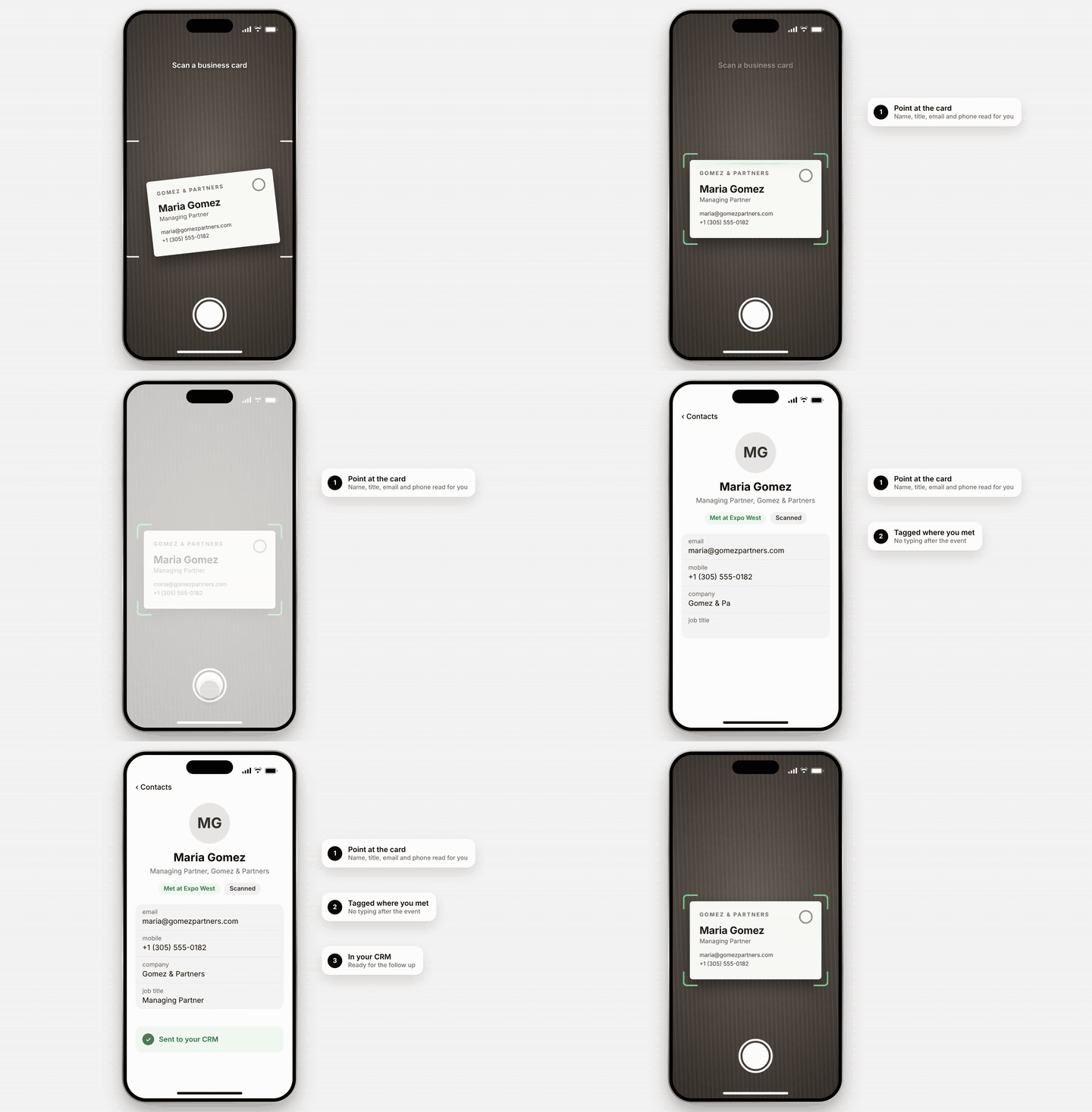
A scanner app fixes the typing. Point your phone at the card and the name, number and email fill in for you.
The catch is the free plan. Many apps give you a handful of free scans, then ask you to pay. One stops at 5 a month. Another stops at 10 in total. So this list puts every app's free limit and real price side by side.
Why listen to us
I'm Haydn, and I started V1CE.
More than 510,000 professionals use V1CE. Teams at SpaceX, Lotus Cars and Air Canada carry our cards.
I spend my days on one problem: getting a contact from a handshake into a CRM without anyone typing it. Scanning paper cards is part of that job, so I've tested a lot of these apps.
One result I'm proud of: Lotus Cars cut the time spent typing contacts into their CRM by 75%. James Woodward, their Head of IT Business Partnering, says: "The V1CE CRM system has transformed how we manage relationships." He tells the story here:
I built V1CE, so I'm not neutral. That's why every app below gets its price, or a note where it isn't published, its free limit and its rating. Where a rival wins, I say so.
V1CE sits at 4.4 on Trustpilot from 1,116 reviews.
What is a business card scanner app?
A business card scanner app reads a paper card with your phone's camera. It pulls out the name, job title, company, phone and email, and saves them as a contact.
The good ones go further. They file the contact, tag where you met, and send it to your CRM. Some also scan event badges, which carry a QR code instead of printed details.
Does your phone already have one? Sort of. The iPhone camera and Google Lens on Android can both read the text on a card. Neither tags where you met or sends the contact to your CRM. For one card a month, your camera is fine. After an event, you want an app.
What to look for
These five checks come from what our customers and thousands of app reviews say matter most.
- 1The free scan limitIn our study of 3,068 reviews of digital card apps, a surprise paywall was the top complaint among five star reviewers. Many of those apps include a scanner. Check how many scans you get free: a week, a month, or in total.
- 2AccuracyIf you fix every card by hand, you're back to typing. Read recent reviews, and scan a busy card on the free plan before you pay.
- 3CRM syncGetting contacts into a CRM automatically came up in 339 of those reviews. Check whether the sync is built in or needs a paid team plan.
- 4Event badge scanningAt trade shows, people wear badges, not cards. Not every scanner reads them, and some charge extra.
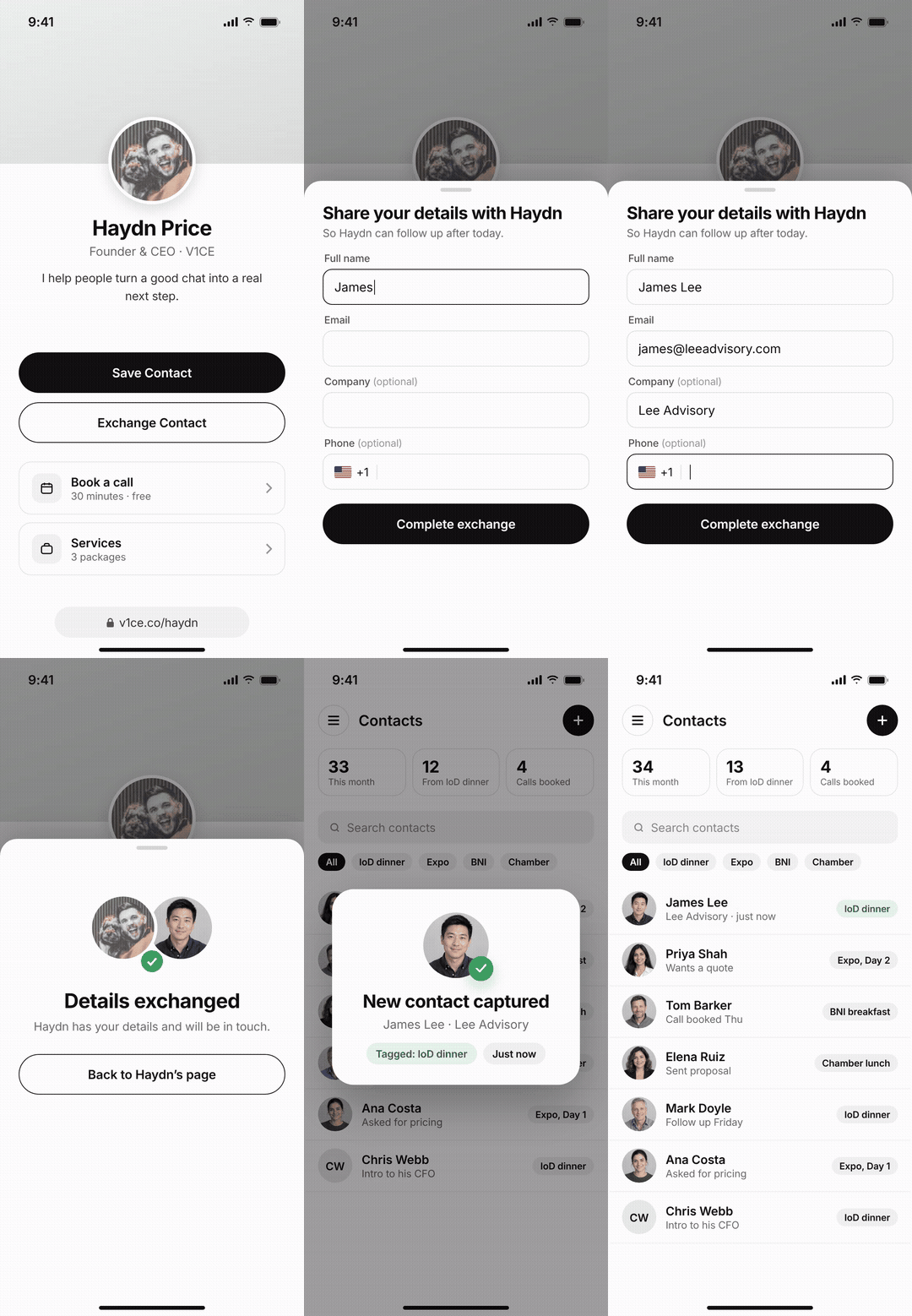
- 5Their details backA scanner only helps when someone hands you paper. When you hand over your card, half the apps on this list get you nothing back. Getting their details back came up in 495 of those reviews.
How do the 10 best business card scanner apps compare?
V1CE is mine, so judge it on the facts. The rest are in order of App Store ratings, most first. I checked every price, free limit and App Store rating on each app's own pricing page or App Store listing on November 16, 2026. "Paid from" is the cheapest paid plan, billed yearly where the app offers it. "No" means it isn't on that app's own pricing page.
The 10 best business card scanner apps, ranked
1.V1CE
4.4 on Trustpilot from 1,116 reviews
Best for: people who meet others face to face and want every contact in their CRM, followed up.
V1CE scans paper cards with AI, with no limit on the free plan. It scans event badges free too. Every contact lands in a built in CRM that syncs to yours, tagged with where you met. And when you're the one handing over a card, they press one button and their details come back to you, already typed.
Key features
- Free: unlimited AI business card scans.
- Free: event badge scanning.
- Free: a built in CRM with notes, tags and search, synced to yours.
- Free: their details come back when you share your card, with no cap on new contacts.
- Free: follow up emails that send themselves.
- Free: built in booking, so a new contact can book a call on the spot.
- Free: export your contacts any time.
Key results
- 510,000+ professionals use V1CE
- 75% less time typing contacts into the CRM at Lotus Cars
Pricing
| Free plan$0 | Unlimited AI card scans are included. |
|---|---|
| Client Capture OS (optional)$64.98 a month | Adds unlimited AI runs, including filling in extra details on every contact. |
| Card (optional) | $83, one payment, designed for you |
| Free plan limits1 page, 1 booking link, a 5% fee on what you sell and 3 AI runs a month | Card scans don't count toward them. |
Pros
- Scans and badge scans are unlimited on the free plan.
- Scanned contacts go straight into a CRM that syncs to yours, free.
- When you hand over your card, their details still come back to you.
Cons
- Filling in extra details on a contact, beyond what's on the card, uses your 3 free AI runs a month.
- CRM sync runs one way, from V1CE to your CRM, and there's no Microsoft Dynamics sync.
Poor fit if: you only want to turn a box of old cards into a spreadsheet. CamCard or ABBYY do that one job.
Before V1CE, I'd come home from events with a pocket full of paper cards and zero follow-ups.
Charlie Harrison, CEO & Co-Founder, Furniture Village
See how the business card scanner works, everything on the free plan and how real teams use it.
2.Blinq
4.9 on the App Store from 133,552 ratings
Best for: people who want a free scanner inside a polished digital card app.
Blinq's free plan includes a "universal contact scanner" that reads paper cards, badges, QR codes and LinkedIn. Its pricing page shows no scan limit. Event badge capture for teams, and native CRM sync, sit on Business, which starts at five cards.

Key features
- Free: a scanner for paper cards, badges, QR codes and LinkedIn.
- Free: two digital business cards and unlimited contacts.
- Business: event badge capture and native CRM sync.
Pricing
| Free | $0 |
|---|---|
| Premium | $7.33 a month |
| Pro | $16.58 a month |
| Business | $4.99 per card a month, 5 card minimum |
Pros
- A free scanner with no limit on its pricing page.
- The most App Store ratings of any app on this list.
Cons
- CRM sync needs Business, with a 5 card minimum, so about $25 a month.
- Event badge capture for teams at trade shows sits on Business too.
Blinq is strong if you want a scanner and a digital card in one free app. See the best Blinq alternatives.
3.Popl
4.8 on the App Store from 103,859 ratings
Best for: event teams who scan badges at trade shows and want it all in their CRM.
Popl is built for events. Its "AI-native Universal Badge Scanner" reads event badges, and it scans paper cards as well. You set up CRM and calendar integrations yourself. Popl doesn't publish prices. You book a demo for a quote.

Key features
- AI badge scanner for events.
- Paper card scanning.
- CRM and calendar integrations you set up yourself.
Pricing
| Free app | $0 |
|---|---|
| Team plansPrice not published | Popl asks you to book a demo. |
Pros
- Strong at trade shows, with badge scanning built for events.
- A free app to share your card and capture details.
Cons
- No prices on its pricing page.
- Its pricing page doesn't state a free scan limit.
Popl suits a marketing team that runs many events a year. See the best Popl alternatives.
4.CamCard
4.7 on the App Store from 90,263 ratings
Best for: people who scan big stacks of cards, often in different languages.
CamCard is a scanner first, and people like it. Zapier's 2026 list names it the best overall scanner app. The free Basic plan gives you 5 high accuracy AI scans a week and stores 100 cards. Premium raises that to 200 scans a month, and PRO to 1,000. Team plans sync to Salesforce, Microsoft Dynamics, SugarCRM, Google Contacts and Outlook.

Key features
- High accuracy AI scanning, 5 a week free.
- Bulk scanning with supported desk scanners on team plans.
- CRM sync on team plans.
Pricing
| Basic | Free, 5 AI scans a week, 100 cards stored. |
|---|---|
| Premium | $9.99 a month, 200 scans a month |
| PRO | $24.99 a month, 1,000 scans a month |
| Teams | By quote, with a 10 day free trial |
Pros
- A fast, well liked scanner.
- Bulk scanning for big backlogs on team plans.
Cons
- 5 free scans a week runs out fast after an event.
- One long time user wrote on the App Store in July 2025 that the app is "full of pop-ups, false starts, some sort of limitations on cards I can scan".
Another long time user wrote on the App Store that he snaps every card as it comes in and uploads it to his CRM. See the best CamCard alternatives.
5.HiHello
4.9 on the App Store from 45,657 ratings
Best for: people who scan a few cards a month and want clear limits.
HiHello puts its scan limits on its pricing page. The free plan scans 5 paper cards or badges a month. Professional raises that to 20, with contact enrichment. Business gives 50 per user a month, shared across the team, plus sync to Salesforce, HubSpot and Microsoft Dynamics.

Key features
- Free: 5 card or badge scans a month.
- Professional: 20 scans a month, with contact enrichment.
- Business: 50 scans per user a month, pooled, plus CRM sync.
Pricing
| Free | $0 |
|---|---|
| Professional | $6 a month, $72 billed yearly |
| Business | $5 per user a month, 5 user minimum |
Pros
- Clear scan limits on every plan.
- Scans are pooled across a team on Business.
Cons
- 5 free scans a month, and badges count toward them.
- CRM sync needs Business, with a 5 user minimum.
HiHello is a clean choice for light use. See the best HiHello alternatives.
6.ABBYY Business Card Reader
4.6 on the App Store from 20,594 ratings
Best for: people who need accurate scans of cards in many languages.
ABBYY makes text recognition software, and its card reader reads 25 languages, including cards printed in more than one. The free version gives you 10 card scans in total. Premium unlocks unlimited scans and Salesforce export, by monthly or yearly subscription. Its App Store listing doesn't show the price.

Key features
- Scans in 25 languages, including mixed language cards.
- Saves to your phone's contacts.
- Salesforce export on Premium.
Pricing
| Free | 10 card scans in total |
|---|---|
| PremiumMonthly or yearly subscription, with a 7 day free trial on monthly | Price not shown on its listing. |
| Pro app | $59.99 on the App Store |
Pros
- Strong language support.
- 20,594 App Store ratings on the free app.
Cons
- Only 10 free scans, ever.
- No event badge scanning, and no way to get their details back.
ABBYY suits someone who mainly needs a reliable scanner and nothing else.
7.HubSpot
4.7 on the App Store from 15,907 ratings
Best for: teams who already run their sales in HubSpot.
HubSpot's scanner sits inside its free mobile app. HubSpot says it is "free forever. No arbitrary limits, no hidden fees." Each card becomes a contact in your HubSpot CRM. If HubSpot is your CRM, it's the simplest free pick.

Key features
- Free card scanning in the HubSpot mobile app.
- Contacts land straight in HubSpot CRM.
Pricing
| Scanner | Free, inside HubSpot's free mobile app |
|---|
Pros
- Free, with no scan limit stated.
- No sync to set up if you already use HubSpot.
Cons
- Only useful if HubSpot is your CRM.
- No event badge scanning listed, and no way to get their details back.
The App Store rating is for the whole HubSpot app, not the scanner alone.
8.Covve
4.8 on the App Store from 4,114 ratings
Best for: people who scan a lot, sometimes with no signal.
Covve's Essential plan scans business cards and QR codes without limit, and it works offline. Pro adds event badge scanning and custom fields mapped to your CRM. CRM integrations with HubSpot, Salesforce, Pipedrive, Zoho and Microsoft Dynamics 365 are an add on. There's no free plan, only a 14 day trial on yearly plans.

Key features
- Unlimited business card and QR scanning.
- Offline scanning.
- Event badge scanning on Pro.
Pricing
| Essential | $119 a year |
|---|---|
| Pro | $199 a year |
| CRM integrations | An add on |
Pros
- Unlimited scans on the cheapest plan.
- Scans without a signal.
Cons
- No free plan.
- CRM sync costs extra.
One Covve customer quoted on its pricing page said they came back from a conference with over 200 business cards. That's the volume it's built for.
9.Wave Connect
4.8 on the App Store from 1,660 ratings
Best for: teams at events who'd rather pay per scan.
Wave's scanner reads paper cards and event badges and runs on credits. A paper card costs 1 credit and a badge 4. The free plan comes with 10 trial credits. Native CRM sync starts on Pro, and Teams starts at 3 users.

Key features
- Card and badge scanning, paid by credit.
- Native CRM sync on Pro.
- Team plans for events.
Pricing
| Free | $0, with 10 trial credits |
|---|---|
| Pro | $7 a month |
| Teams | $5 per user a month, 3 user minimum |
| Credits | $2.50 each |
Pros
- You only pay for the scans you use.
- Badge scanning for trade shows.
Cons
- Every scan costs credits, on every plan.
- CRM sync needs Pro.
Wave suits a team that scans in bursts a few times a year. See the best Wave Connect alternatives.
10.Haystack
4.3 on the App Store from 170 ratings
Best for: one person who wants free unlimited scanning.
Haystack's free plan includes an AI card scanner with no limit, plus unlimited digital cards and shares. CRM integrations start on the paid plans. Business seats for teams of 10 or more are $2.50 a user a month.

Key features
- Free: unlimited AI card scans.
- Free: unlimited digital cards and shares.
- CRM integrations on paid plans.
Pricing
| Free | $0 |
|---|---|
| Pro | $4.50 per user a month, billed yearly |
| Business | $2.50 per user a month, billed yearly, for teams of 10 or more. |
Pros
- Free unlimited scans.
- Low team prices for 10 or more people.
Cons
- No event badge scanning listed.
- The fewest App Store ratings on this list.
Haystack does the core job, scanning paper, with no cap. See the best Haystack alternatives.
Which scanner app should you pick?
One person at networking events: choose V1CE. Scans are unlimited and free, and when you hand over your card, their details come back too.
A big stack of cards every week: choose CamCard or Covve, and budget for a paid plan.
A team at trade shows: choose Popl, Covve Pro or Wave Connect, or V1CE, which scans badges free.
Already on HubSpot: choose HubSpot. It's free and the contacts land where you work.
A few cards a month: HiHello or your phone's camera is enough.
Free unlimited scanning for one person: choose Haystack.
V1CE is the right fit if you meet people face to face and want the follow up done, not only the typing. It's the wrong fit if you only want to clear a box of old cards into a spreadsheet.
Start free on V1CE. Scanning is unlimited on the free plan.
FAQs
What is the best free business card scanner?
V1CE and Haystack both scan without a limit on their free plans. HubSpot's scanner is free with no limit stated, but it only sends contacts to HubSpot. V1CE also scans event badges free and brings the other person's details back when you hand over your card.
Does the iPhone have a business card scanner?
Not a full one. The iPhone camera can read the text on a card, so you can tap a number or email. It doesn't tag where you met or send the contact to a CRM. A scanner app does that.
How do I scan business cards into Salesforce or HubSpot?
Use a scanner with sync built in. HubSpot's free app sends cards to HubSpot. CamCard syncs to Salesforce on team plans, and ABBYY exports to Salesforce on Premium. V1CE syncs to your CRM on the free plan, one way, from V1CE to your CRM.
Can these apps scan event badges?
Some can. V1CE scans badges free. HiHello counts badges toward its scan limits, and Covve puts them on Pro. Wave charges 4 credits a badge, Blinq puts event badge capture on Business, and Popl builds its scanner around them. CamCard, ABBYY, HubSpot and Haystack don't list badge scanning.
Is there a monthly fee for V1CE's scanner?
No. The software is free for life and the scanner is included, with no scan limit. Client Capture OS is an optional upgrade at $64.98 a month.
Stop typing. Start following up.
Unlimited AI card scans and badge scans on the free plan, and every contact in your CRM. Free for life.
- 510,000+
- professionals use V1CE
- Free for life
- software, no monthly fee
- 30 days
- money-back guarantee

Written by
Haydn Price
Founder
Founder of V1CE. I've helped 510,000+ professionals swap paper cards for a card that gets their contacts back.


